Threat Reach. See how far a threat actually got.
Most tools tell you an IP was seen. Threat Reach shows you how far it got, across every node in your federation.
One query. Clear reach.
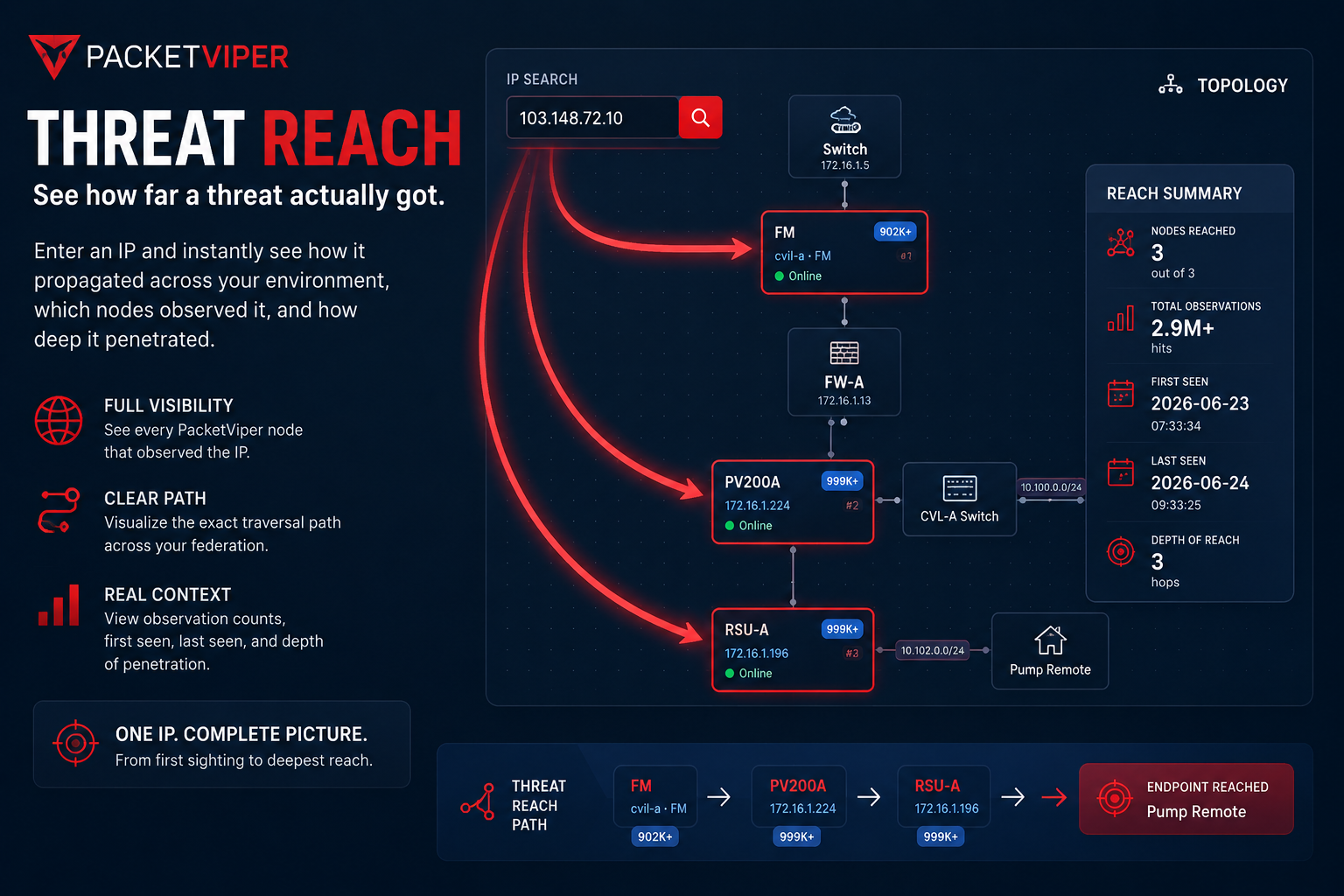
An IP was seen. But how far did it actually get?
A SOC analyst sees a suspicious IP. The real question is not what the IP is. It is how far it reached. Did it touch one site or twelve? Edge only, or all the way to the control center?
Most tools show isolated sightings at each location. Stitching them together by hand wastes the minutes that matter most during an active incident.
The Manual Stitching Problem
Log into site A, search. Log into site B, search. Log into site C, search. Manually correlate timestamps across three different consoles. This is how most teams answer “how far did it get?” today.
Enter one indicator. See the full reach.
Enter an IP, asset, or threat indicator and see exactly how far it reached across your environment.
- Every PacketViper node that observed it
- First and last seen timestamps
- Observation volume per node
- The full traversal path across the federation
- Reach visualized on the topology map
This turns scattered sightings into immediate operational context. Faster triage, clearer containment decisions, and a real understanding of how threats propagate in distributed OT environments.
One IP can hit many sites. Threat Reach sees them all.
In a federated deployment a single IP can appear at multiple sites. Traditional tools show isolated sightings. Threat Reach shows the full picture in one view. One site or twelve. Edge only or control center. Lateral movement or not.
That is the difference between we saw it and we know exactly how far it got.
Federation-Wide Correlation
Every node in your federated deployment contributes sightings to a single traversal view.
Depth and Breadth in One View
Did it reach the edge only, or propagate to the control center? Threat Reach answers both dimensions at once. Pairs with Analytics for deeper data.
The complete path in a single view.
Instead of checking logs at site A, then site B, then site C, you get the complete path at once. First seen. Last seen. Nodes touched. How deep it propagated. All on the topology map.
Threat Reach cuts investigation time and removes the manual log stitching. It is part of the broader Investigation and Threat Intel toolkit in PacketViper.
Common questions about Threat Reach
Threat Reach is PacketViper’s federation-wide forensics view. You enter an IP, asset, or threat indicator and see every node that observed it, when it was first and last seen, how many times, and the full path it traveled across your environment.
A normal log search shows sightings at one site. Threat Reach correlates sightings across every federated PacketViper node into a single traversal path, so you see how far a threat actually reached instead of stitching logs together by hand.
Every PacketViper node that observed the IP, first and last seen timestamps, observation volume per node, the traversal path across the federation, and the reach drawn on the topology map.
In distributed OT environments a single indicator can appear at many sites. Threat Reach reveals whether a threat touched one site or many, whether it reached the control center, and how deep it propagated, which drives faster and more accurate containment.
Threat Reach shows observed reach – not attribution.
A sighting is a data point. Reach is operational context. Threat Reach answers how far an IP, asset, or indicator actually propagated across monitored boundaries: which nodes observed it, how far it got, and what evidence supports the conclusion. It turns a single sighting into investigation scope.
The control loop: Observe → Understand → Decide → Enforce → Prove. Detection answers what did we see. Control answers what should be allowed to happen.
See how far threats are really getting in your network.
We will show you Threat Reach running against real federated traffic in a live demo.
Explore further
How PacketViper turns traffic into context you can act on.